Web
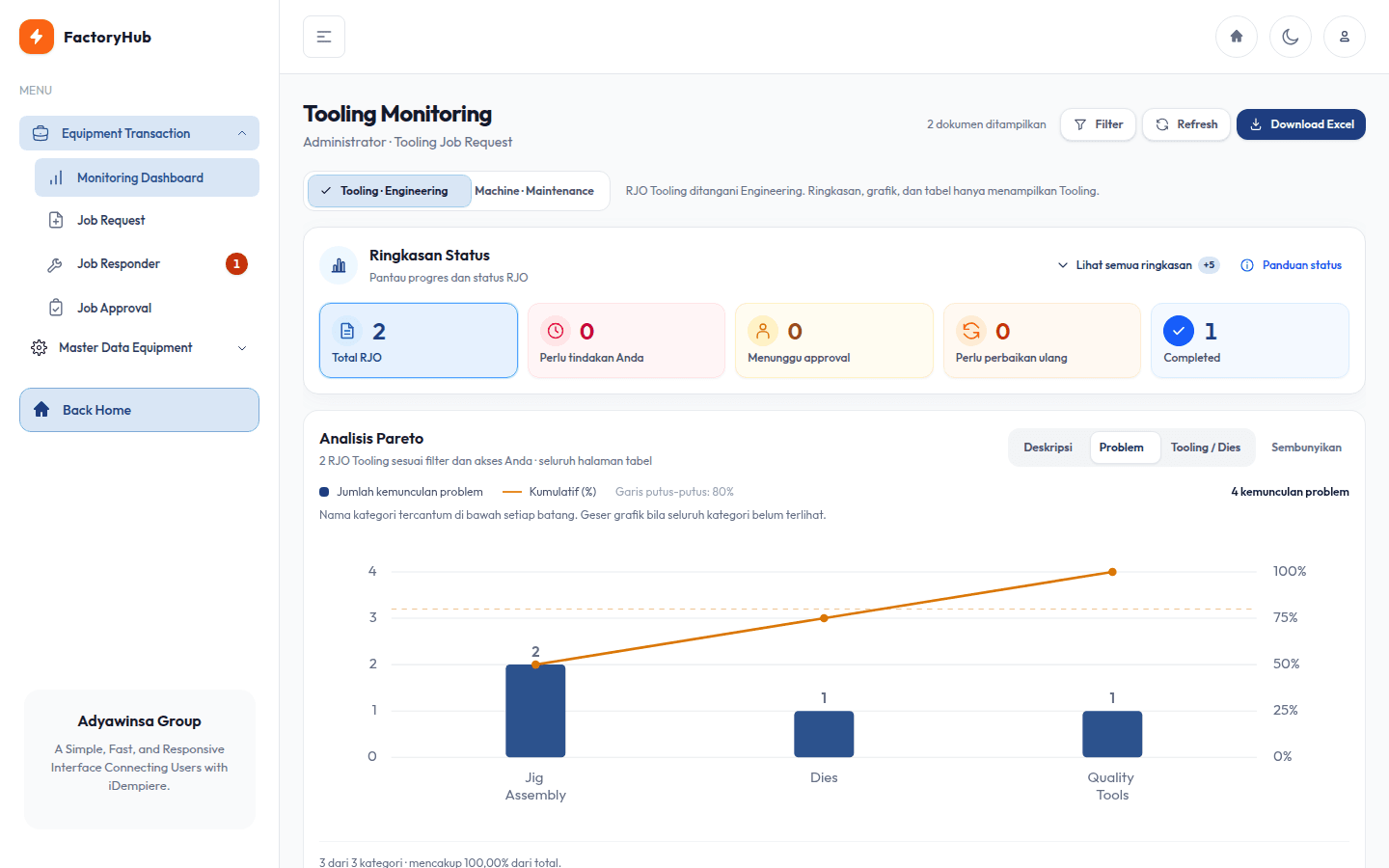
Monitoring dashboard
Status cards that double as filters and a Pareto chart of the most frequent tooling problems.
Case study · 04 / 08
Tooling and machine repairs, tracked from the production request through Quality trials to head approval.
An Equipment Job Request (RJO) workflow for production tooling and machine repairs on top of the iDempiere ERP. Grown in FactoryHub from a basic RJO CRUD into a cross-department request, repair, trial, and approval flow, then ported into ShopFloor, PT Tri Centrum Fortuna's shopfloor ERP portal.
Key achievement
Turned a basic repair-request CRUD into a cross-department workflow connected to the ERP, then brought it into the main ERP portal.
01 · Context
Primary users
The problem
Repair requests for tooling and machines started as basic CRUD: a request could be created and printed, but nobody could tell who had to act next. Quality trials, sequential approvals, and rework cycles were not recorded, so repair progress was hard to follow per department.
The approach
The RJO was rebuilt as a cross-department state machine. Production submits a request with damage photos, Engineering or Maintenance does the repair, Quality records OK/NG trials, and department heads approve in sequence before the iDempiere document is completed. Each role gets Request, Responder, Approval, and Monitoring pages scoped to its access.
Key numbers
02 · My role
Software Engineer Intern · Full-stack
Technology used
Redesigned the RJO as a staged flow: Production request, repair, Quality trial, rework, and head approval.
Connected the final approval to the iDempiere ERP so a document completes only after every approval.
Built a monitoring dashboard with Pareto charts, filters, and Excel export for Engineering and Maintenance.
Built dedicated mobile views for the production floor, including damage photos straight from the camera.
Ported the module into ShopFloor, the company's main ERP portal, adapting to its different login flow and theme.
03 · Highlights
Click an image to view it larger.
Swipe through them all, tap an image to enlarge it.
01 / 04
Status cards that double as filters and a Pareto chart of the most frequent tooling problems.
Engineering/Maintenance approve first, then Production, before the document completes in the ERP.
Each team immediately sees the work waiting for them.
A mobile view with next-step hints and bottom navigation for operators.
04 · Challenges & decisions
01 / 03
05 · Outcome
Every RJO has a status, an owner for the next step, a trial history, and an approval trail that each department can follow. ERP documents are completed only after both approvals, and the workflow, access, and export rules are covered by 18 test files.
User flow
Architecture
Interface
Blade · Tailwind CSS · Alpine.js · desktop and mobile layouts
Application
Laravel · staged workflow · department-based access
ERP integration
iDempiere REST API · document status synced on final approval
Output
Pareto charts · Excel export · print-ready PDF